push-wache
Protection against dangerous commands in Claude Code: stops risky commands before they run - against accidents, not against intent.
What it does
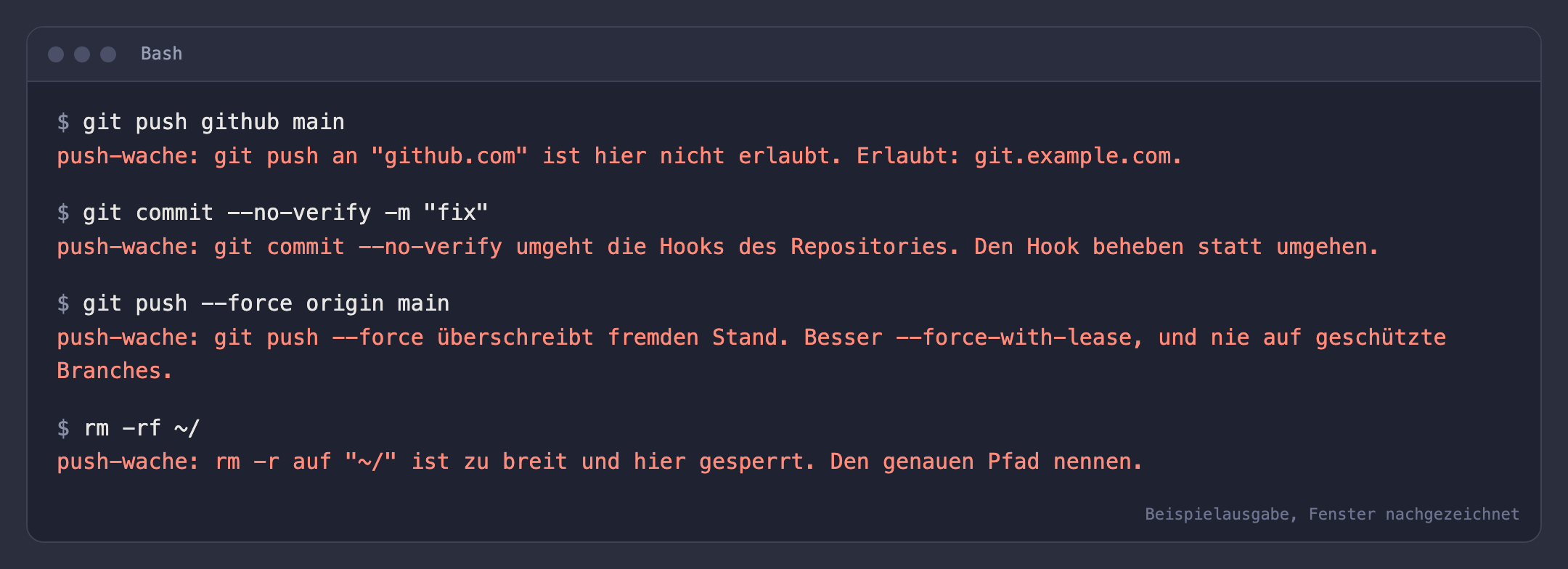
push-wache checks every command Claude Code wants to run via the Bash tool and rejects it with an understandable reason if it breaks a rule: git push to a host that is not on your list, git commit or push with --no-verify, force push, rm -r on the root, home folder or current directory, and known keys and tokens on the command line.
You decide which rules apply, which hosts may be pushed to and which branches are protected. The plugin protects against accidents, not against intent.
Who it is for
Developers, agencies and teams who let Claude Code work on client code.
Key features
- Push target: only hosts on your list (wildcards such as *.example.com possible)
- No bypassing hooks: --no-verify on commit and push, -c core.hooksPath
- Force push: plain always blocked, with lease or delete only on protected branches
- Broad rm -r: root, home, dot, star, /Users/NAME, /Volumes/NAME and similar
- Credentials: Anthropic, AWS, GitHub and Slack keys, private keys, JWT
- Every rule can be switched off individually, the message names the reason
What it looks like
The image is an example: the window is redrawn, the texts in it come from the plugin itself, from its real functions and tests.
Limitations
push-wache is not a security boundary. It does not see what a script does internally, subcommands in parentheses, aliases or obfuscated commands. It does not replace a pre-push hook, server-side permissions or backups.
Settings
Allowed hosts, protected branches and the individual rules are set in Claude Code's configuration menu or in settings.json under pluginConfigs; see the guide for details.
Requirements
- Claude Code, in the terminal or the desktop app
- Tested with version 2.1.310 on macOS - older versions may not support the plugin interface, other systems have not been tested
Installation in brief
Unzip the file and put the push-wache folder in a permanent place. To try it out, start it once in the terminal:
claude --plugin-dir ~/claude-mods/push-wachePermanently, also for the desktop app: add the entry CLAUDE_CODE_PLUGIN_DIRS with the full path under env in ~/.claude/settings.json and restart Claude Code. If you use several plugins, list their paths one after another, separated by a colon (a semicolon on Windows). The full guide is included in the ZIP as ANLEITUNG.md (German).
Privacy
The plugin sends nothing to oQueo and nothing to third parties.
Licence
MIT licence, copyright (c) 2026 Robert-P. Pelikan, oQueo. The name, trademarks, logos and corporate design of oQueo are excluded from the licence. The full licence text, as included as LICENSE in the ZIP:
MIT License

Copyright (c) 2026 Robert-P. Pelikan, oQueo (https://oqueo.io)

Permission is hereby granted, free of charge, to any person obtaining a copy
of this software and associated documentation files (the "Software"), to deal
in the Software without restriction, including without limitation the rights
to use, copy, modify, merge, publish, distribute, sublicense, and/or sell
copies of the Software, and to permit persons to whom the Software is
furnished to do so, subject to the following conditions:

The above copyright notice and this permission notice shall be included in all
copies or substantial portions of the Software.

THE SOFTWARE IS PROVIDED "AS IS", WITHOUT WARRANTY OF ANY KIND, EXPRESS OR
IMPLIED, INCLUDING BUT NOT LIMITED TO THE WARRANTIES OF MERCHANTABILITY,
FITNESS FOR A PARTICULAR PURPOSE AND NONINFRINGEMENT. IN NO EVENT SHALL THE
AUTHORS OR COPYRIGHT HOLDERS BE LIABLE FOR ANY CLAIM, DAMAGES OR OTHER
LIABILITY, WHETHER IN AN ACTION OF CONTRACT, TORT OR OTHERWISE, ARISING FROM,
OUT OF OR IN CONNECTION WITH THE SOFTWARE OR THE USE OR OTHER DEALINGS IN THE
SOFTWARE.

-----------------------------------------------------------------------------

Zusatz zur Lizenz (Marken)

Diese Lizenz gewährt keine Rechte an Namen, Marken, Logos und dem Corporate
Design von oQueo. Der Name "oQueo" und die Bildmarken dürfen nicht benutzt
werden, um abgeleitete Werke oder Produkte zu benennen oder zu bewerben, ohne
dass Robert-P. Pelikan, oQueo (https://oqueo.io) vorher schriftlich zugestimmt
hat. Der Urheberrechtsvermerk oben muss davon unabhängig erhalten bleiben.

Additional notice (trademarks)

This license does not grant any rights to the names, trademarks, logos or
corporate design of oQueo. The name "oQueo" and its logos must not be used to
name or promote derivative works or products without the prior written
consent of Robert-P. Pelikan, oQueo (https://oqueo.io). The copyright notice
above must be retained regardless.